How StarRez and Workday Integration Streamlines University Move In with CampusHaul OS
Move-in week rarely fails because of one big problem. It gets messy because of hundreds of small handoffs: room assignments change, student records update, early arrivals get approved, carts go missing, volunteers ask for the latest list, and parents arrive before the loading zone is ready.
Most housing teams already have the right systems for the major jobs. StarRez manages housing assignments and residence life workflows. Workday often holds student, financial, HR, and operational data. The problem is the space between those systems and the physical work happening at curbside, check-in tables, residence halls, storage areas, and delivery routes.
That is where CampusHaul OS fits. It acts as the logistics layer between campus housing data and move-in execution, giving housing operations a clearer way to plan, assign, track, and adjust the work without adding another disconnected spreadsheet to the pile.

Move-in week is a data problem as much as an operations problem
Move-in looks physical from the outside. Trucks, carts, keys, elevators, volunteers, parking zones, and check-in lines are easy to see.
Behind all of that is data.
Housing teams need to know:
Who is arriving
Which building and room they belong to
Whether the assignment is final
What time window they selected
Whether they have accommodations
Whether they are part of an early arrival group
Who is approved to help
Which deliveries or on-campus services are tied to that student
Which tasks are complete and which are still open
When that information lives in multiple systems, staff often bridge the gap manually. Someone exports a StarRez report. Someone else checks Workday. A third person edits a spreadsheet. A hall director keeps a separate tracker. Student workers use printed rosters. By the afternoon, several versions of the truth are floating around campus.
That administrative clutter creates real operational risk. A last-minute room change may not reach the move-in crew. A student may arrive at the wrong staging zone. A staff member may spend time searching for information rather than solving the issue in front of them.
A StarRez moving integration should not replace the housing system. It should help the move-in operation use housing data where the work actually happens.
StarRez and Workday each play a different role
StarRez and Workday solve different campus problems. Move-in week touches both.
StarRez is commonly used by housing and residence life teams to manage room assignments, applications, contracts, meal plan or housing-related workflows, resident records, and communications. During move-in, it is often the trusted source for who belongs in which space.
Workday may support broader campus operations. Depending on the institution, it may hold student information, HR records for staff assignments, financial workflows, procurement details, or labor-related data that affects who can work, what resources are available, and how services get charged or tracked.
CampusHaul OS does not need to become the system of record for either one. Its value comes from giving operations teams a focused place to run the move-in process.
System | Common role in move-in | What CampusHaul OS adds |
StarRez | Housing assignments, resident status, arrival eligibility, room and building details | Turns housing data into logistics tasks, routes, schedules, and real-time work queues |
Workday | Student, staff, finance, HR, or operational records, depending on campus setup | Connects labor, service, and operational context to the physical move-in workflow |
CampusHaul OS | Move-in execution layer | Coordinates people, places, time windows, supplies, deliveries, and status updates |
This separation matters. Housing teams should not have to force a housing platform to behave like a field operations tool. They also should not have to ask a campus ERP to manage carts, elevators, and curbside traffic. A dedicated logistics layer lets each system do what it does best.
What CampusHaul OS connects during move-in
A useful integration starts with the data elements that shape the day. CampusHaul OS can plug into existing campus housing management tools so staff can manage move-in with fewer manual transfers and fewer duplicate records.
Common integration points may include:
Resident and assignment data
CampusHaul OS can use student-level housing records to build the operational map for move-in. That includes residence hall, floor, room, roommate group, arrival status, and move-in eligibility.
Arrival windows and check-in status
Move-in plans often depend on time slots. When arrival windows connect to the logistics platform, staff can balance curbside demand, stagger traffic, and see whether students have arrived, checked in, or still need help.
Building and room attributes
Not all residence halls move the same way. An elevator building has different needs than a walk-up hall. A suite-style hall has different cart demand than a traditional corridor building. Those details affect staffing, loading zones, signage, and routing.
Staff and labor assignments
When Workday or another campus source holds staffing information, integration can help connect approved workers, shifts, roles, and departments to the move-in plan. That gives supervisors a cleaner view of coverage without rebuilding staff lists by hand.
Service requests and special handling
Students may need approved accommodations, storage delivery, shipping support, linen or microfridge services, or special arrival handling. When those requests appear in the logistics workflow, staff can plan for them before the student reaches the curb.
Status updates
Move-in produces constant updates. A student has arrived. A cart is assigned. A delivery is complete. A task is delayed. The value of university move in software is not just storing those updates, it is making them useful to the next person in the chain.
The goal is less manual work, not another dashboard
Housing teams do not need another place to copy and paste data. They need fewer places to reconcile data.
Without integration, move-in planning often follows a familiar pattern:
Export the latest assignment file.
Clean the file.
Share it with several teams.
Update it when assignments change.
Repeat after the next batch of changes.
Hope the frontline team is using the latest version.
That process is slow and fragile. It also pulls skilled staff into administrative work at the exact time they need to focus on students, families, safety, and exceptions.
With CampusHaul OS connected to StarRez and Workday, the process can shift. Housing and operations teams can work from controlled, role-based views built around the move-in job.
For example:
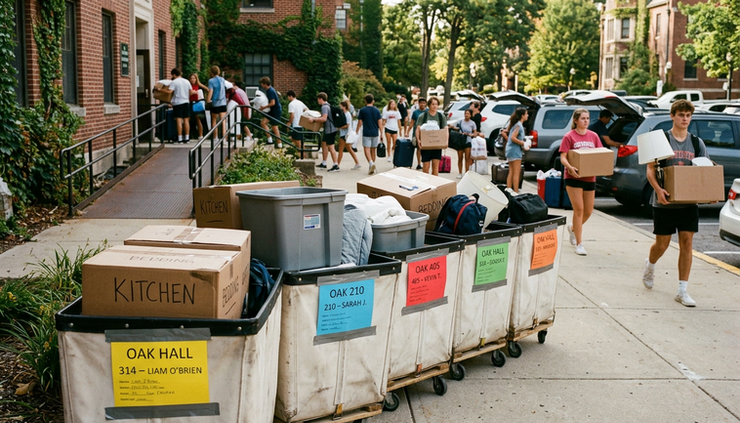
A check-in lead sees expected arrivals by building and time window.
A curbside team sees the student, stop, cart need, and destination.
A supervisor sees open tasks, bottlenecks, and staffing gaps.
A hall team sees which rooms have completed move-in support.
A central command team sees exceptions across campus.
That level of clarity reduces the noise. Staff can stop asking, “Which spreadsheet is right?” and start asking, “What needs attention next?”
Integration helps manage the day as conditions change
Move-in plans change. That does not mean the plan failed. It means the system needs to handle change without creating confusion.
Several common scenarios show why connected data matters.
A room assignment changes late
If the housing system changes but the move-in tracker does not, the student may be routed to the wrong building. An integrated logistics layer can help reflect the updated assignment in the operational workflow sooner, depending on the campus data setup and sync design.
A student arrives outside the planned window
Late and early arrivals happen. Staff need a quick way to find the student, confirm eligibility, and route help without searching across systems.
A residence hall elevator goes down
CampusHaul OS can help shift tasks, adjust routes, and flag delays. The assignment data still comes from the housing system, but the operational response happens in the logistics layer.
A staff shift needs coverage
If staff information and roles are connected, supervisors can see where gaps appear and move trained people where they are needed most.
A delivery is tied to a student record
Some campuses manage storage, shipping, or delivery services as part of move-in. Connecting those services to housing records helps reduce missed deliveries and duplicate handling.
These are not edge cases. They are normal move-in week conditions. The question is whether the team manages them through calls, texts, and improvised spreadsheets, or through a shared operational system.
The technical approach should respect campus systems
A good integration strategy does not mean opening every system to every user. It means moving the right data to the right place with the right controls.
For decision makers, several technical factors matter.
System of record clarity
StarRez should remain the source for housing assignments if that is how the campus operates. Workday should remain the source for the records it owns. CampusHaul OS should consume and update move-in logistics data without blurring ownership.
Configurable data mapping
Every campus has different building codes, room naming conventions, student groups, arrival categories, and service workflows. Integration should allow mapping that fits campus reality rather than forcing teams into a generic template.
Role-based access
A student worker at a cart station does not need the same data as a housing director. A logistics platform should show only what each role needs to complete the task.
Audit-friendly workflows
Move-in creates decisions and exceptions. When a task changes hands or a delivery is completed, the system should retain enough history to support follow-up and accountability.
Practical sync timing
Not every data point needs instant updates. Some fields may sync on a scheduled basis. Others may need faster movement during peak arrival periods. The design should match operational risk.
Data security and governance
Student housing data is sensitive. Integration planning should involve campus IT, housing leadership, and the teams responsible for privacy and security. The best outcome is useful operational access without unnecessary exposure.
What changes for housing operations after integration
The strongest reason to connect CampusHaul OS with StarRez and Workday is not technical elegance. It is the change in daily work.
Before integration, housing operations may rely on:
Repeated exports
Manual roster cleanup
Separate staff trackers
Printed lists that go stale
Email threads for exceptions
Text messages for urgent routing
End-of-day reconciliation
After integration, the team can move toward:
Shared arrival visibility
Building-specific work queues
Cleaner handoffs between teams
Real-time task status
Faster exception handling
Fewer duplicate records
Better post-move-in review
The difference shows up in small moments. A parent asks where to unload, and staff can answer with confidence. A student arrives after a room change, and the system points to the correct hall. A supervisor sees a bottleneck before it becomes a line down the street.
That is the purpose of a campus housing logistics platform. It turns the housing data a campus already trusts into the operational steps needed to run move-in well.
How to evaluate readiness for CampusHaul OS integration
Not every campus needs the same integration on day one. A phased approach often works best.
Start with the highest-friction workflows. For many housing teams, that means assignment data, arrival windows, and building-level move-in planning. Once that foundation works, staff and service workflows can follow.
A readiness review should cover five questions:
Where does each key data point live now?
Identify the source for assignments, student status, arrival windows, staff roles, and service requests.
Which manual steps create the most risk?
Focus on the exports, edits, and handoffs that most often cause delays or errors.
Who needs access during move-in?
Map roles by task, not by department alone.
How fast does each update need to move?
Decide which updates are urgent and which can follow a scheduled sync.
What should the team measure after move-in?
Track what matters, such as check-in flow, task completion, delivery status, staffing coverage, and exception volume.
This review keeps the project grounded. The goal is not to connect systems for the sake of connection. The goal is to remove the clutter that slows down move-in planning and execution.
CampusHaul OS gives move-in teams an operational layer
StarRez and Workday hold important campus data. CampusHaul OS helps that data support the physical reality of move-in week.
When the systems connect well, housing teams spend less time cleaning files and more time managing the experience. Staff see the right information for their role. Supervisors can respond to problems while they are still small. Students and families get clearer direction at the moment they need it.
The best move-in technology does not make campus operations feel more complicated. It makes the work easier to coordinate, easier to trust, and easier to improve year after year.



Comments